When I first started working at a public library, I was amazed to learn how many people used Goodreads, LibraryThing, spreadsheets, and other platforms to catalog their home libraries.
I recently learned that Amazon owns and mines Goodreads data. As it turns out, Amazon also has a minority stake in LibraryThing, but is legally barred from accessing anything but anonymized, aggregated data. Instead, LibraryThing links books back to Amazon to drive sales.
If you’re a spreadsheet whiz and you only want minimal information about the books you’ve read, you can make a custom catalog that covers more than books using Excel, Sheets, or another spreadsheet program. That seems labor-intensive to start from scratch, though.
Today I learned about another platform, Libib, that supports more item types than the others. The basic account is free and lets users store up to 5000 items, including books, movies, music, video games, and board games.
Why Would I Catalog My Home Library?
I have never felt the urge to catalog my home library, so I asked a couple of friends why they do. Here is what they said:
- If I’m in a used bookstore, I want to see whether I already own a title before I buy it.
- I lend books to friends and want to be sure I get them back.
- I note which books I’ve read so that, when I’m looking for something to read, I can pull up a list of things I own but haven’t read.
- [I’m a collector, and] it helps me keep track of incomplete series and other “holes” in my collection.
Whatever your reason, let’s look at how Libib can help.
Libib Basics
First, it’s important to note that Libib doesn’t mine your data, even if you use a free account. To confirm that for yourself, here are their Privacy Policy and Data Privacy Framework.
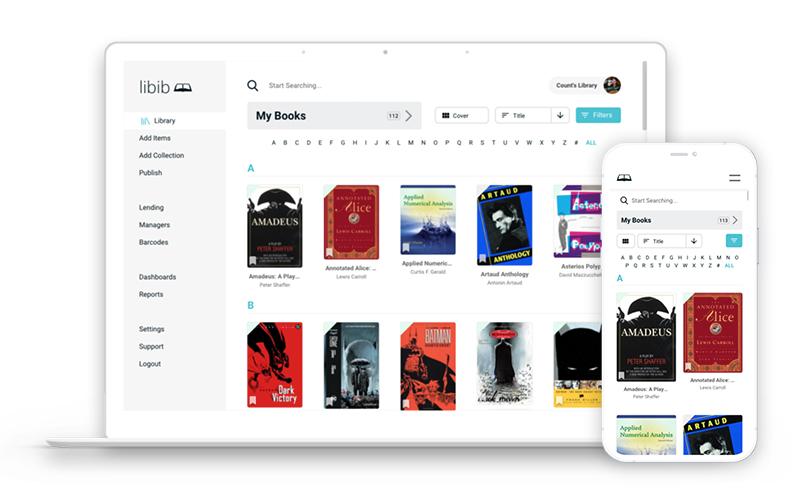
Libib has both a desktop (browser) version and a mobile app (Android, iOS).
Features include:
- Companion app for both Android and iOS, which makes scanning ISBN barcodes a breeze
- Create collections (up to 100 on any plan)
- Ability to publish one or more of your collections on a personal page
- Import or export data via a .CSV file
- Add tags and notes to items in your library
The folks at Libib have done a great job providing step-by-step support documents and video tutorials. I won’t try to reinvent the wheel with this post. Instead, I’ll talk in more general terms about the service.
Planning Ahead
Libib lets you create up to 100 separate collections and tag items individually. Deciding on a collection structure ahead of time can save time later.
How you choose to implement your collections depends on how you’d like them arranged. Some ideas:
- Collections by item owner (Mom, Dad, Fran, Bobby)
- Location (home library, office library, or specific room)
- Language
You can also separate your collections by media type, but you can filter searches by media type without making them collections. However, if you are cataloging non-traditional items, collections by media type may make sense for your library.
For designations like genre or subject, consider tags instead. There is no limit on allowed tags.
Adding Items
Using the camera on your phone (app) or barcode scanner connected to your computer, you can scan ISBN barcodes to add items to your library quickly. After scanning, you’ll get a message:
- Confirming it worked
- Stating it couldn’t scan
- Letting you know you already have that book
If the item doesn’t scan or doesn’t find a match automatically, you can use the search function or enter the title manually. Some possible reasons an item wouldn’t scan:
- It has an ISBN, but not an associated barcode
- It is a reprint version that isn’t in the Libib database
- The barcode is damaged or covered
- Server error (usually resolves itself after a brief time)
If you search for an item, you might find a different edition in the database. It is up to you whether that is close enough for your purposes, or if you would rather enter the information manually to be more precise. Note that you may not be able to edit all fields in the record when using the free version of Libib.
Adding an item includes basic information. You can add reviews, tags, and notes, as well as change the status (not begun, abandoned, in progress, completed) of the item. You can also use the group function to keep series titles together.
Exporting Library Records
The terms of use state that the service could go away at any time. If you’re spending hours and hours entering your personal library items, that’s not a comforting statement. Thankfully, Libib can export your library to .CSV. You can use this to back up your library at any time. If something happens to Libib, you will likely be able to use that .CSV to import your library into another cataloging tool.
Premium Features
Libib offers two paid tiers geared toward lending libraries. Features include:
- Ability to check items in and out, as well as place holds
- Patron management
- Barcode management
- Reports
- Multi-user management (e.g., add users with management permissions)
- Patron app
- Custom fields and more options for editing (including bulk)
- SSO login (logging in using Google, Microsoft, etc.)
- Up to 100,000 items
- Centralized account dashboard
Unless you lend heavily from your personal library, or it is enormous, you probably won’t need either paid tier.
Criticism from Users
As part of the research for this article, I read lots of reviews to gain insight I wouldn’t necessarily get from my limited testing.
- The search function can be “wonky”, at times requiring varied search strategies to find titles.
- Can’t search the author field specifically for an author’s name
- Trouble sorting search results
- Navigating the web app is counterintuitive – lacking a “back” or “close” button. But the large screen makes it easier to enter data manually and view search results.
- They don’t provide a way to switch from a paid account to a free account in the account settings. You have to remove your payment method.
- One user reported losing the entire library after canceling the associated credit card due to theft. The person says they were locked out with no recourse.
Summary
There are many ways to track a personal library. Libib lets you move beyond spreadsheets and social platforms to organize your collection and make it searchable on your terms.